<script type="application/ld+json"> { "@context": "https://schema.org", "@type": "FAQPage", "mainEntity": [ { "@type": "Question", "name": "What should a change communication plan include?", "acceptedAnswer": { "@type": "Answer", "text": "A change communication plan needs six parts, covering the audiences the change affects, the key messages for each, the channels you'll use, the timing of each send, a named owner for every row, and a feedback loop. The feedback loop should include a questions channel and read confirmation from every group that has to act on the change." } }, { "@type": "Question", "name": "How far in advance should you announce a change to employees?", "acceptedAnswer": { "@type": "Answer", "text": "Brief managers first, then announce to employees with enough runway to set a confirm-by date before go-live and follow up with anyone who hasn't read it. The template uses two weeks as an example, but size the lead time to the change, since a major system change needs more runway than a small policy update." } }, { "@type": "Question", "name": "Who owns the change communication plan?", "acceptedAnswer": { "@type": "Answer", "text": "The comms lead owns the document and the send schedule, and the change sponsor owns the reason for the change and the escalation path. Every row in the plan should also carry one named owner, often a people manager handling follow-through with their team, so nothing is left to a department." } }, { "@type": "Question", "name": "How do you confirm employees read a change announcement?", "acceptedAnswer": { "@type": "Answer", "text": "Add an acknowledgment to the announcement so each employee confirms they've read it, with a timestamp recorded against their name. Mail privacy features and security scanners can trigger opens and clicks, so those signals don't prove a person read the message. Follow up only with the employees who haven't confirmed." } }, { "@type": "Question", "name": "Is there a free change communication plan template?", "acceptedAnswer": { "@type": "Answer", "text": "Yes. The table in this post is a free change communication plan template you can copy into a doc or spreadsheet, with example rows for audiences, messages, channels, dates, owners, read confirmation, and follow-up. For the announcement email itself, Cerkl also offers a free organizational change announcement email template." } } ] } </script>
Change Communication Plan: A Template You Can Copy (and the Step Most Plans Skip)
Change Communication Plan: A Template You Can Copy (and the Step Most Plans Skip)
A change communication plan template you can copy: audiences, messages, channels, timing, owners, and the step most plans skip: confirming each employee read it.
Written By:
Cerkl Research Team
Published:
October 20, 2026
Using Outlook or Gmail for your internal communication?
Foundations is free (forever) - purpose built for internal comms and includes everything you need to level up your game (email builder, analytics, pulse surveys and much more).
A change communication plan is a time-boxed document that sets out who a change affects, what each group needs to hear, through which channels, when, from whom, and how you'll confirm they read it. It runs from the first announcement until every affected employee has confirmed, and it closes when the change is live and the questions have stopped.
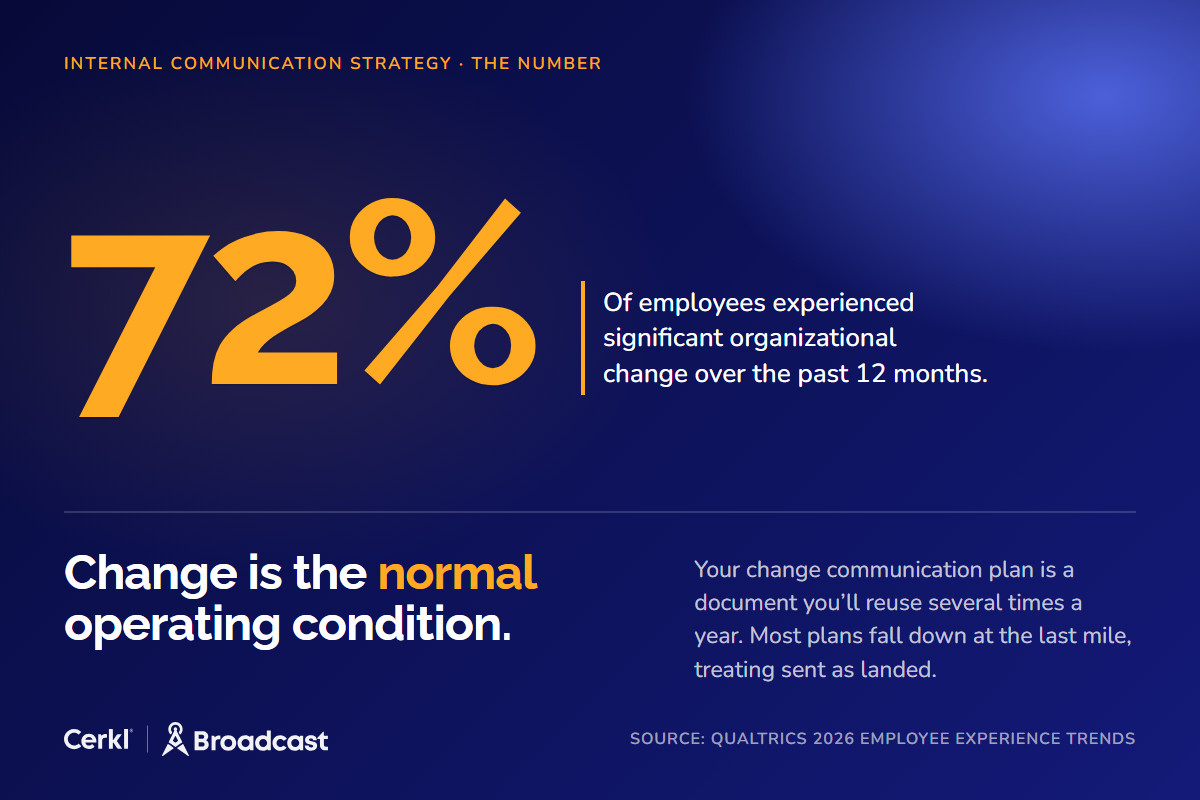
In Qualtrics' 2026 Employee Experience Trends research, 72% of employees said they had experienced significant organizational change over the past 12 months, across a sample of 33,831 responses in 24 countries. Change is the normal operating condition, so your change communications plan is a document you'll reuse several times a year. Most plans cover audiences, messages, channels, and dates well enough. They fall down at the last mile, because they treat "sent" as "landed." Employees can't act on a change they never read, so understanding starts with reading it. Below is a template you can copy, with that missing step built into every row.
Change Communication Plan
What Is a Change Communication Plan?
A change communication plan is the working document behind one specific change, whether that's a new payroll system, an office move, a benefits switch, or a reporting-line shuffle. It lists every group the change touches, the message each group needs, the channel and date for each send, the person who owns it, and the evidence you'll collect that it landed.
It differs from your internal communication plan in scope and lifespan. That one is your standing, year-round plan for recurring newsletters and leadership updates. A change plan plugs into it for a single change, with a go-live date and an end date. The change plan closes when the change is done, and whatever you learned goes back into the standing plan.
Plans tend to fail in a predictable place. The sponsor approves the messaging, the comms lead schedules the sends, the emails go out, and someone marks the plan complete. You never find out whether the night-shift supervisors or the payroll admins read the thing that changes their week. If you want the principles that sit underneath a good plan, the change communications best practices cover them. This post is the fill-in document.
What Goes in a Change Communication Plan?
Every organizational change communication plan needs six parts. Skip one and you'll feel it around go-live as a flood of tickets from a group you forgot existed.
Audiences
Segment by impact. Start with the people whose daily work changes. Then list the adjacent groups who will notice the change or field questions about it, followed by people managers, who need the message before their teams do. Leadership needs status updates. Frontline and deskless employees need a separate line in the plan, because they're the group most likely to miss an email-only rollout.
Key messages
Each audience needs answers to the same five questions about what's changing, why, what it means for them, what they need to do, and by when. For the announcement itself, start from a free organizational change announcement email template.
Channels
Email is the record of the announcement. It's the version employees can search for later and point back to when they ask "when did they tell us this?" Team meetings, manager huddles, chat, and the intranet all reinforce the message, but none of them is the record. If you're tailoring the message by segment, AI in change communication covers how personalization fits into a transformation.
Timing
Brief managers first, then announce, reinforce, go live, and check in afterward. Managers who hear about a change at the same moment as their teams can't answer questions, and their teams notice.
Owners
The comms lead owns the document and the send schedule, and the sponsor owns the reason for the change. Every row in the plan also gets a named owner, often a people manager handling follow-through with their team, because "HR" is a department and can't be chased.
Feedback loop
Give employees one place to ask questions, and collect read confirmation from every must-act group. That second item is the step most plans skip, and the template below builds it into every row.
Change Communication Plan Template (Copy This)
The change communication plan template below is filled in for a fictional 400-person company moving to a new payroll system. Copy the table into a doc or spreadsheet and replace the rows with your own. If your organization calls this a change management communication plan template, it's the same document.
Audience
What changes for them
Key message
Channel
Send date
Owner
How we'll confirm they read it
Follow-up if not confirmed
People managers
They field every question from their teams about timesheets and pay stubs.
"Here's what's changing, what your team needs to do, and how to answer the top five questions."
Email pre-brief plus manager meeting
T−2 weeks
Comms lead
Acknowledgment
Re-send to non-confirmers on T+2; sponsor nudge on T+4
All hourly employees
New timesheet steps from go-live
"Starting on go-live day, you'll submit hours in the new system. Here's how, and here's the deadline for your first timesheet."
Email, reinforced in team huddles
T−0
Payroll lead
Acknowledgment
Re-send to non-confirmers on T+2; manager nudge on T+4
Salaried employees
New portal for pay stubs and tax forms
"Your pay stubs move to a new portal. Here's how to log in before your first payday."
Email
T−0
Payroll lead
Acknowledgment
Re-send to non-confirmers on T+2; manager nudge on T+4
Payroll and HR admins
New admin workflow, new approval steps
"Training dates, cutover checklist, and who to call during the first pay run."
Email plus training sessions
T−2 weeks
HR director
Acknowledgment
Re-send to non-confirmers on T+2; direct call on T+4
Leadership
Nothing in their day-to-day; they need status
"Where the rollout stands, confirmation rates by group, and open risks."
Email status update
Weekly from T−2 weeks
Sponsor
Open and click signals (FYI only)
None needed; raise in the next leadership meeting
The confirmation column does the real work. Any group that has to do something gets an acknowledgment, which is an explicit "I've read this" with a timestamp against each name. Groups that only need to be informed, like leadership here, can run on open and click signals because nothing breaks if one of them skims.
Keep a timeline under the table so everyone sees the sequence at a glance.
T−2 weeks: managers and payroll admins briefed
T−0: announcement to all affected employees
T+2 days: follow-up sent only to employees who haven't confirmed
T+5 days: confirm-by date; managers get the list of names still outstanding
Go-live: new system on
T+30 days: one-question understanding pulse
Size the two-week runway to the change. A new parking policy needs less lead time than a new pay system.
How Do You Segment Audiences for a Change Announcement?
Group people by how the change affects them. In the payroll example, hourly and salaried employees sit in the same departments, yet the change asks different things of each. A department-based send would give the warehouse supervisor's team a message about pay-stub portals when what they need is the new timesheet steps.
Build those segments from live HR data. A spreadsheet someone exported in August goes stale, because changes take weeks to roll out and during those weeks people get hired, transfer between teams, switch from hourly to salaried, and leave. If your segments update from the HR system on every sync, a new hire who starts the week before go-live lands in the right group on send day without anyone remembering to add them. Audience Manager in Cerkl Broadcast works this way, with segments built from rules on employee attributes that stay current as the source data changes, so "affected employees" is a list you can check.
Then give each segment its own version of the message. The core of the announcement stays word-for-word identical, so nobody can claim they were told something different. The "what this means for you" and "what you need to do" sections change per segment, and that's the part employees look for.
Critical messages that you know they've seen...
Foundations includes acknowledgements for free - an easy way to track which employees have (and haven't) taken action. No more guessing.
How Do You Know Employees Read the Change Announcement?
This is the measurement step in a change communication plan, and it's where most plans go quiet. The common assumption is that an open rate tells you who read the email. It doesn't, because software opens email too.
Apple's documentation for Mail Privacy Protection says that Protect Mail Activity downloads remote content in the background by default, "regardless of whether you engage with the email." Remote content includes the tracking pixel that records an open, so an employee using Apple Mail can register an open without ever looking at your message. On the corporate side, Microsoft's Safe Links documentation states that when Safe Links protection is on, URLs are scanned prior to message delivery. In organizations running it, a security scanner accounts for some of your link activity. An open is a signal and a click is a stronger one, but neither tells you a named employee read the change.
An acknowledgment does. The employee clicks the acknowledgment in the email, confirms on the landing page, and Broadcast records the timestamp against their name. You end up with an exportable list of who confirmed and when, with a blank next to everyone who hasn't. That's the difference between telling the sponsor "we sent it" and telling them "everyone affected has read it, except these eleven people, and their managers have the list." For the mechanics, read how acknowledgments work in internal comms.
Treat the evidence as a four-rung ladder that runs delivered, opened, clicked, acknowledged. Each rung tells you more than the one below it, and only the top rung is a per-employee confirmation. FYI groups can stop at the middle rungs. Anyone who has to change how they work on go-live day should reach the top. Acknowledgments are included in Cerkl Broadcast Foundations, the free internal email platform, so this step costs nothing to add.
What Do You Do About Employees Who Haven't Read It?
Follow up only with the people who haven't confirmed. Re-sending the full announcement to everyone punishes the employees who already did what you asked and trains them to ignore the next one. Change fatigue is a real constraint here. Gallagher's 2025 Employee Communications Report, which surveyed more than 2,000 communication and HR leaders across 55 countries, found that 44% named change fatigue among their most challenging barriers. A targeted follow-up to the non-confirmers on T+2 respects everyone else's inbox.
For the last holdouts, use managers, but don't assume the cascade works on its own. The same report found that 41% of those leaders cited poor people-manager communication as a top barrier. Managers are busy, and "please remind your team" gets lost. Give them a short list of names and a two-sentence script with the deadline built in, such as "These four people on your team haven't confirmed the timesheet change. Please mention it in Thursday's huddle and ask them to click the acknowledgment by Friday." Cascading communication gives managers a structure for passing messages down, and your job is to hand them the specific gap to close.
Set a confirm-by date before go-live and treat it as a real deadline. If someone in a must-act group still hasn't confirmed on that date, their name goes to their manager, and if needed to the sponsor. It feels heavy-handed until the first payroll run, when the person who never read the timesheet instructions misses a week of hours.
How Do You Measure Whether a Change Communication Plan Worked?
Use a layered check, because no single number covers it.
Start with the read-confirmation rate for each segment. A strong overall rate can hide one site or one shift where almost nobody confirmed, and per-employee read receipts name the people in it. Next, track the questions that came in and whether each one got answered. A cluster of questions about the same step tells you the message was unclear, even if everyone confirmed it.
Then ask one pulse question about thirty days after go-live, such as "Do you know what changes for you on [date]?" Pulse results come back as an aggregate share, so you'll know how much of a segment feels clear without seeing individual answers. Last, look at behavior at go-live, such as help-desk tickets and timesheet errors. That's the outcome the whole plan exists to protect.
Keep the layers in order. Reading is the first measurable step toward understanding, and the later layers show whether understanding followed. An employee who confirmed and still submitted the wrong timesheet tells you the message needs work. An employee who never confirmed tells you the message never reached them.
Change Communication Plan vs. Change Management Plan: What's the Difference?
A change management plan covers the whole change, including process redesign and training. Whoever leads the change owns it, and communication is one workstream inside it.
The change communication plan is that workstream. It gets each message to the people who need it on schedule, then confirms they read it. If you're working at the strategy level and want the bigger picture with examples, change management communication covers the approach end to end. The template above is what you fill in once that strategy is set.
Run the Plan on the Free Plan
Every step in this template runs on Cerkl Broadcast Foundations, which is free forever with no credit card. You can build segments from HR data, schedule each send for its date on the timeline, add an acknowledgment to every must-act announcement, retarget only the employees who haven't confirmed, and export per-employee reporting to show the sponsor where things stand. Foundations includes 5,000 sends a month and 3 communicator seats, enough room for a change plan at a company the size of the one in the example. If you later need calendar invites or publishing to other employee channels, you upgrade in place and your segments and history carry over.
Copy the table and fill in your first row today. Start your change plan on Foundations, and the next time someone asks whether employees know about the change, you'll answer with names.
If you're frustrated with Outlook or Gmail for your employee emails, we understand.
That's why we built Foundations. Purpose-built for internal email with all the features you wish you had - drag-and-drop email builder, analytics, employee segmentation and much more. All for free (forever). No credit card, no contracts, no setup fees.
A change communication plan needs six parts, covering the audiences the change affects, the key messages for each, the channels you'll use, the timing of each send, a named owner for every row, and a feedback loop. The feedback loop should include a questions channel and read confirmation from every group that has to act on the change.
How far in advance should you announce a change to employees?
Brief managers first, then announce to employees with enough runway to set a confirm-by date before go-live and follow up with anyone who hasn't read it. The template uses two weeks as an example, but size the lead time to the change, since a major system change needs more runway than a small policy update.
Who owns the change communication plan?
The comms lead owns the document and the send schedule, and the change sponsor owns the reason for the change and the escalation path. Every row in the plan should also carry one named owner, often a people manager handling follow-through with their team, so nothing is left to a department.
How do you confirm employees read a change announcement?
Add an acknowledgment to the announcement so each employee confirms they've read it, with a timestamp recorded against their name. Mail privacy features and security scanners can trigger opens and clicks, so those signals don't prove a person read the message. Follow up only with the employees who haven't confirmed.
Is there a free change communication plan template?
Yes. The table in this post is a free change communication plan template you can copy into a doc or spreadsheet, with example rows for audiences, messages, channels, dates, owners, read confirmation, and follow-up. For the announcement email itself, Cerkl also offers a free organizational change announcement email template.
Did you enjoy this content? Please share it with your internal comms friends and colleagues. Just click on any of the links below.



.jpg)